Your new Orbi is plugged in, but the upstairs bedroom still has no connection. Before moving satellites or restarting everything, check the basics: which unit connects to your modem, which Ethernet port you used, and whether satellite pairing has finished.
This Netgear Orbi RBE373 Setup guide walks you through those checks, installation, and device connections. You will also learn how to recognize a successful connection and troubleshoot without immediately erasing your settings.
Before You Start Your Netgear Orbi RBE373 Setup
The RBE373 package includes one RBE371 router and two RBE370 satellites. Identify the router by its label and Internet port; the satellites extend coverage but do not replace the router connected to your internet equipment.
Have these items ready:
- An active internet service and compatible modem or provider gateway.
- The supplied Ethernet cable and three power adapters.
- A smartphone with the Orbi app installed.
- Your NETGEAR account details, or an email address to create an account.
- Any connection settings specifically required by your internet provider.
For U.S. cable service, keep your activated cable modem. Fiber installations may use an Ethernet handoff from an ONT or require the provider’s gateway. Orbi does not accept a coaxial cable or fiber line directly.
Decide How to Use an Existing Gateway
If your provider’s device combines a modem and router, decide which device will handle routing. You can use Orbi in access point mode behind the existing router, or use a provider-supported bridge or passthrough configuration with Orbi handling routing.
Check your provider’s instructions before changing gateway settings, especially if it also supplies phone or TV services. Leaving both devices routing can create double NAT, which may complicate gaming or port forwarding.
Netgear Orbi RBE373 Setup Using the Orbi App
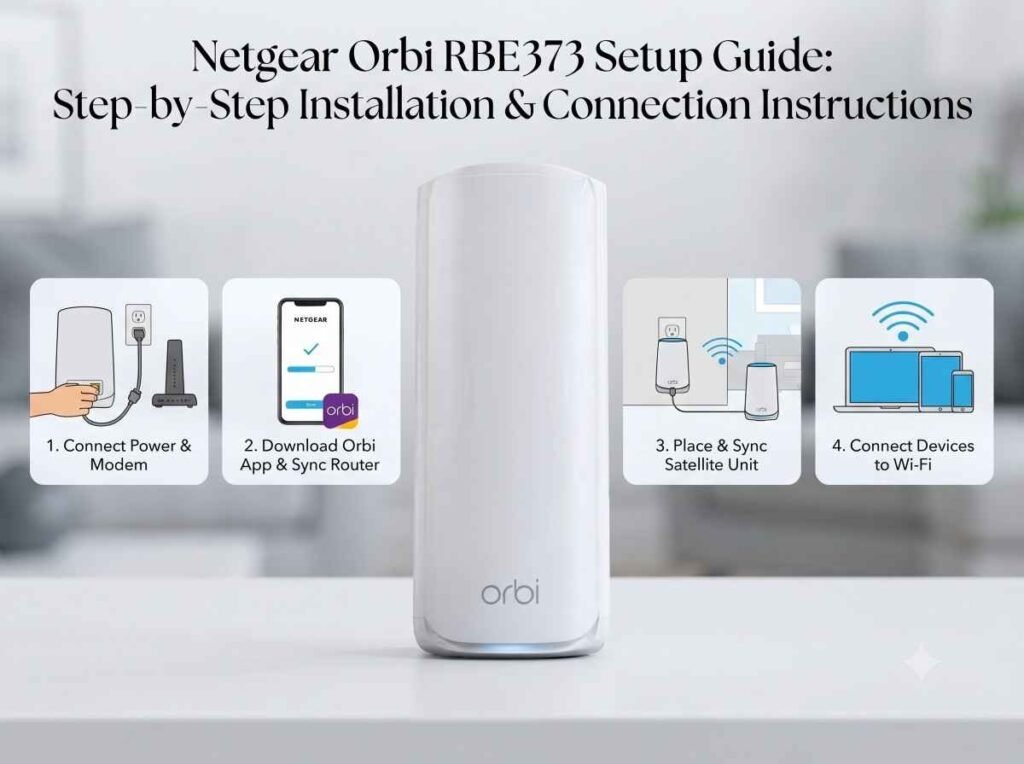
Step 1: Connect the Router to Your Modem
Unplug your modem and the old standalone router, if you are replacing one. Connect an Ethernet cable from the modem’s Ethernet port, or the gateway’s LAN port, to the Orbi router’s yellow 2.5G Internet port.
Restart the modem and wait for its normal online indicators. Power on the Orbi router and allow it to boot. Leave the satellites unplugged until the setup process asks for them.
Step 2: Start the App and Join Orbi WiFi
Open the Orbi app, sign in, and select the option to set up an Orbi system. Scan the QR code on the router’s sleeve or base when prompted.
Follow the prompts to join the default WiFi network shown on the router label. Allow requested local network access so the app can discover the router; if discovery fails, confirm your phone has not rejoined your old WiFi network.
Step 3: Create Your Network Credentials
Choose a WiFi network name and a strong password. Set a separate router administrator password when prompted, and save both securely.
These credentials serve different purposes: the WiFi password connects household devices, while the administrator password controls router settings. Your NETGEAR account is another separate login.
Step 4: Connect Both Satellites
Power on the satellites when instructed and let the app complete discovery. Keep them near the router during initial pairing if their intended rooms have weak reception.
If a satellite is missing, use the app’s Add Satellite option. For manual synchronization, press Sync on the router, then press Sync on the satellite within two minutes.
Interpret the satellite’s front status light as follows:
- Blue: Connected with a good link.
- Amber: Connected, but the link is fair; move it closer.
- Magenta: Pairing failed.
- Off after pairing: Normal operation, not automatically a power problem.
Step 5: Finish Updates and Test Coverage
Install firmware updates offered during setup and keep every unit powered until updates finish. Then place each satellite between the router and the area needing coverage, where it can still receive a useful signal.
Avoid enclosed cabinets and large metal obstructions. Reconnect your phone to the new network, open a webpage, and test from each satellite’s room. Repeat with a laptop or TV before deciding the installation is complete.
Can You Complete Netgear Orbi RBE373 Setup Without the App?
Yes. Connect a computer to Orbi’s default WiFi using the router label, or connect it to the router’s LAN port with Ethernet.
Enter orbilogin.com on Windows or Android, or orbilogin.local on Apple devices, in the browser address bar. If the local name fails, try the default IP address, 10.168.168.1.
Follow the installation wizard to configure internet access, administrator credentials, WiFi, and satellites. If the IP address has changed, use the current gateway address shown in your computer’s network details.
Troubleshooting Netgear Orbi RBE373 Setup Problems
WiFi Connects, but Websites Do Not Load
Check that the modem cable reaches the Internet port, not the LAN port. Restart the modem first, wait for it to reconnect, and then restart Orbi.
If the provider’s connection is also down, resolve that first. For further checks, follow our Netgear Orbi no internet guide.
A Satellite Will Not Connect
Move the affected satellite into the router’s room and retry synchronization. Once connected, move it back gradually and check its connection again.
For additional troubleshooting, see Unable to connect the Netgear Orbi 370. Avoid factory resetting as your first step because it removes saved configuration.
Frequently Asked Questions
Does the Orbi RBE373 Replace My Modem?
No. It provides routing and mesh WiFi. You still need the modem, ONT connection, or gateway required by your internet provider.
Do I Need WiFi 7 Devices to Use Orbi RBE373?
No. Compatible older WiFi devices can connect. WiFi 7 features require compatible clients, and actual speeds depend on your internet plan, device capabilities, and placement.
Why Did My Orbi Satellite’s Blue Light Turn Off?
The blue status light normally turns off after about three minutes. Check connectivity or the app’s network map before assuming the satellite disconnected.
Can I Connect an Orbi Satellite With Ethernet?
Yes. The RBE370 supports Ethernet backhaul. A wired connection between the router’s LAN port and the satellite’s Ethernet port can help where walls weaken wireless coverage.