Orbi Router Magenta Light: Causes and How to Fix It
Seeing a magenta light on your Orbi router can be frustrating, especially when your WiFi suddenly stops providing Internet access. The good news is that a magenta LED does not automatically mean your Orbi hardware has failed.
In most cases, the orbi router magenta light indicates that the router cannot establish an active Internet connection. The cause may be your modem, Ethernet cable, ISP service, WAN connection, IP address, or Orbi configuration.
Before performing a factory reset, identify which Orbi device is showing the light and follow the troubleshooting path that matches the problem.
First: Is the Magenta Light on the Router or Satellite?
This distinction is important because the same color can indicate different problems. According to NETGEAR documentation, a solid magenta router light means the Orbi has no Internet connection. On a satellite, magenta can indicate that the satellite has no backhaul connection to the router or has not received an IP address.
| Orbi Device | LED Status | Likely Meaning | What to Check |
|---|---|---|---|
| Router | Solid Magenta | No Internet connection | Modem, WAN cable, ISP and IP connection |
| Satellite | Solid Magenta | No backhaul or IP address | Distance, synchronization and network connection |
| Satellite | Solid Blue | Good backhaul connection | Usually no action required |
| Satellite | Solid Amber | Fair backhaul connection | Consider moving it closer |
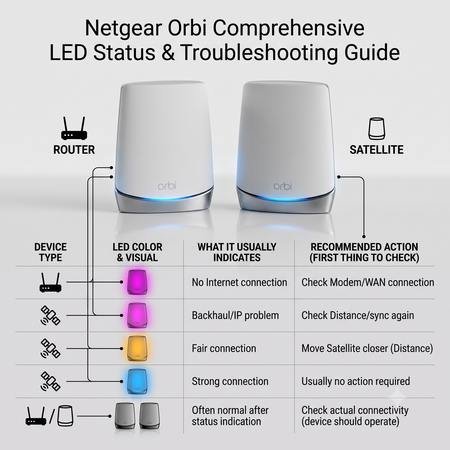
LED behavior can vary between Orbi generations and models, so check the documentation for your specific model if the light pattern differs from the information above.
How to Fix an Orbi Router Magenta Light
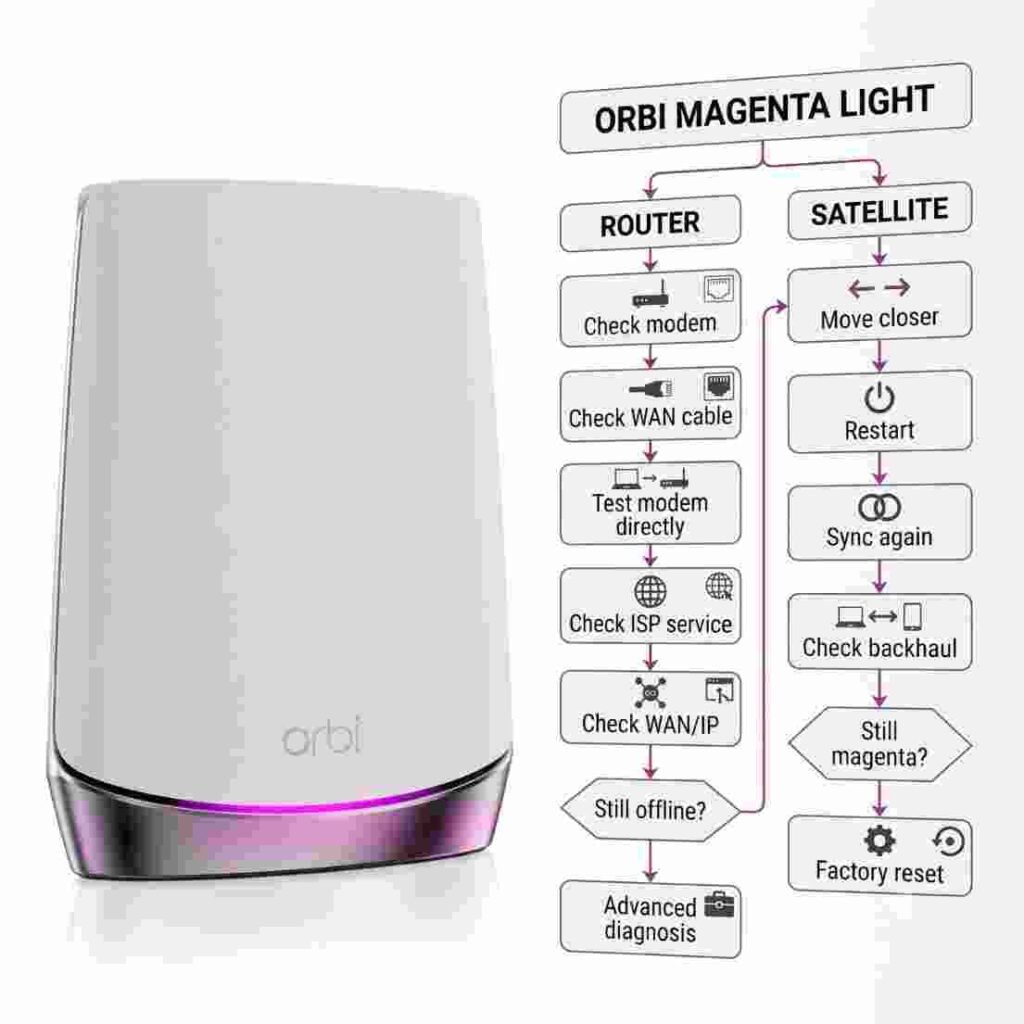
1. Check Whether Your Modem Has Internet
Start with the modem instead of immediately changing Orbi settings. If the modem has lost its connection to your ISP, the Orbi router cannot provide Internet access even though your local WiFi network may still appear on your devices.
If possible, connect a computer directly to the modem using Ethernet. If that computer also cannot access the Internet, contact your ISP or check for an outage before troubleshooting the Orbi router further.
2. Check the Ethernet Connection
Inspect the Ethernet cable connecting the modem to the Orbi router. Make sure one end is firmly connected to the modem and the other is connected to the Orbi router's Internet or WAN port.
- Reconnect both ends of the Ethernet cable.
- Check for visible cable damage.
- Try another Ethernet cable if available.
- Make sure the cable is connected to the correct modem and router ports.
3. Restart the Modem and Orbi in the Correct Order
A complete power cycle can resolve temporary communication or IP-address problems. The order matters because the Orbi should reconnect after the modem has established its connection with the ISP.
- Turn off the Orbi router.
- Unplug the modem from power.
- Wait about two minutes.
- Reconnect the modem.
- Wait until the modem reconnects to the ISP.
- Turn the Orbi router back on.
- Allow several minutes for the Orbi system to initialize.
If the orbi router magenta light disappears and your devices regain Internet access, the issue was likely temporary.
Check the Orbi WAN and IP Connection
If the light remains magenta, check the Internet or WAN status through the Orbi app or web interface. The router should receive an IP address from the modem or upstream network.
If the Orbi does not receive an IP address, the problem may involve the modem, DHCP service, ISP authentication, or network configuration. Some ISPs may also require settings such as PPPoE credentials, VLAN information, or MAC registration.
Check for a Double-NAT Configuration
If your ISP gateway is already acting as a router and your Orbi is also operating in router mode, you may have a double-NAT configuration. This does not always prevent Internet access, but it can create connectivity problems for certain applications and devices.
Do not change bridge or access-point settings unless you understand how your ISP equipment is configured. The correct setup depends on your modem or gateway and Internet service.
If you are experiencing broader connectivity problems, see our guide on Netgear Orbi no internet connection for additional troubleshooting.
What If the Orbi Satellite Has a Magenta Light?
Satellite troubleshooting is different. A magenta satellite light can indicate that the satellite has lost its backhaul connection to the router or does not have an IP address.
Try these steps:
- Move the satellite closer to the main Orbi router.
- Restart the satellite and router.
- Check whether other satellites are connected normally.
- Press the Sync button on the Orbi router.
- Within two minutes, press the Sync button on the satellite.
- Wait for the satellite LED to indicate a successful connection.
NETGEAR states that a blue satellite LED indicates a successful synchronization, while magenta after synchronization indicates that the router and satellite failed to sync.
Still Seeing the Orbi Router Magenta Light?
If the orbi router magenta light continues after checking the modem, Ethernet cable and power cycle, avoid immediately performing a factory reset. First determine whether the modem works independently and whether the Orbi is receiving an IP address.
Also check your ISP for an outage and confirm that any required Internet credentials or connection settings are correct. If the problem began after a firmware update, configuration change, or hardware replacement, note that timing because it can help identify the cause.
If you recently purchased an Orbi system or need to configure the network again, follow our step-by-step Setup Netgear Orbi guide.
Frequently Asked Questions
What does the magenta light on an Orbi router mean?
A solid magenta light on an Orbi router generally means that the router does not have an Internet connection. Check the modem, Ethernet cable, ISP service, and Orbi Internet or WAN connection.
How do I fix the magenta light on my Orbi router?
Check that your modem has Internet service, verify the Ethernet cable between the modem and Orbi router, and restart the modem before restarting the Orbi router. If the problem continues, check the Orbi WAN or Internet status and your ISP settings.
Why is my Orbi router magenta but my modem is working?
A working modem does not always mean the Orbi router has received a valid Internet connection. Check the modem-to-Orbi Ethernet connection, WAN port, IP address, and router configuration.
What does a magenta light on an Orbi satellite mean?
A magenta light on an Orbi satellite can mean that it has lost its backhaul connection to the Orbi router or does not have an IP address. Move the satellite closer, restart it, and try syncing it again.
Does a magenta light mean my Orbi router is broken?
No. A magenta light does not automatically mean that the Orbi router is damaged. It commonly indicates an Internet connection problem involving the modem, WAN connection, ISP service, or network configuration.
Should I factory reset my Orbi when it shows a magenta light?
A factory reset should not be the first troubleshooting step. Check the modem, Ethernet connection, ISP service, WAN status, and satellite synchronization before resetting the Orbi system.
Get Your Orbi Connection Working Again
The orbi router magenta light is usually a connection-status warning, not proof that your router has failed. Start by identifying whether the light is on the router or satellite, then check the modem, WAN cable, Internet service, IP connection, and satellite synchronization as appropriate.
If basic troubleshooting does not restore your connection, avoid repeatedly resetting the system. Use the Orbi troubleshooting resources on OrbiHelp to identify the underlying problem or contact a qualified network support professional for assistance.
Need help getting your Orbi network back online? Follow the troubleshooting guides on OrbiHelp or contact a network support professional who can review your specific modem, Orbi router, satellite, and ISP configuration.